

Picture the first day for a new revenue hire.
They get a laptop, a login, and a calendar full of introductions. They do not get admin rights on the CRM. They do not get the ability to enroll 4,000 contacts into a sequence. They do not get access to billing. Nobody says this out loud, because nobody has to. Every operator already knows that trust is extended in steps, and that the steps are tied to what a mistake would cost.
Now think about how AI agents are being connected to GTM stacks right now.
An agent gets a credential. The credential is usually someone’s personal login or a broad API token. Within an afternoon, that agent can read the pipeline, edit records, and trigger outbound. The same operator who would never hand a new hire that access on day one grants it to software in a single setup session.
I want to name that gap, because it is about to get much bigger. This post is about AI agent write permissions in the GTM stack, and one framework for making the decision on purpose: The Write Boundary Map.
What Happened in the Last Month
Two pieces of content moved a lot of operators toward connecting agents to their stacks.
On Aug 24, Darrell Alfonso published a post titled “The #1 Marketing Ops Skill in 2027 is MCP.” It promoted a live session on Sep 10 where six vendors demonstrated MCP workflows in front of practitioners, from product analytics queries to campaign management to attribution audits. If you work in marketing ops, it is worth reading in full: Darrell Alfonso’s post.
On Sep 11, the GTM Strategist publication run by Maja Voje released a hands-on episode called “Hands On: RevOps Workflows From Your AI Agent.” It showed how revenue teams can build, test, and ship RevOps workflows from the command line using coding agents. Here is the episode: GTM Strategist hands-on episode.
Both are useful. Both make the same shift feel normal: the agent stops being a chat window and becomes something that acts inside the systems where revenue is recorded.
To be fair to the people doing this work, the safety conversation is not absent. Darrell’s earlier MCP explainer lists guardrails on what an AI can do alone as one of the parts of context, and it names an escalation path back to a human. That is the right instinct. What I did not see in the demos and the headlines was the decision made system by system, in writing, with a named owner: this system the agent can only read, this one it can draft in, and this one it can write to.
That is the gap. The Write Boundary Map is my attempt to turn one line of guidance into an operating document.
MCP Is a Permissions Decision
Here is the plain version of MCP. The Model Context Protocol is a standard way for an AI app to connect to tools and data. A tool supports it once, and any AI app that speaks MCP can use it. That is a real improvement. It removes the custom integration work.
But notice what it does not remove: the decision about what the connection is allowed to do.
An MCP connection exposes tools. Some of those tools read. Some of them write. What the agent can actually do is bounded by the credential behind the connection, not by the enthusiasm of the person who set it up. So the skill is not “knowing MCP.” Learning the protocol takes an afternoon. The skill that matters is deciding, for each system in your stack, how much authority the agent gets.
That is not a technical skill. It is an operator decision, the same kind you make when you assign a role in Salesforce, approve a sequence, or decide who can publish to a customer-facing page. It belongs to whoever is accountable for the outcome.
Definition: A write boundary is the documented limit on which systems an AI agent may change, what kinds of changes it may make, and who approved that limit. The Write Boundary Map is a one-page classification of every system in a GTM stack into one of three tiers: read-only, draft-only, or write-approved.
The Write Boundary Map
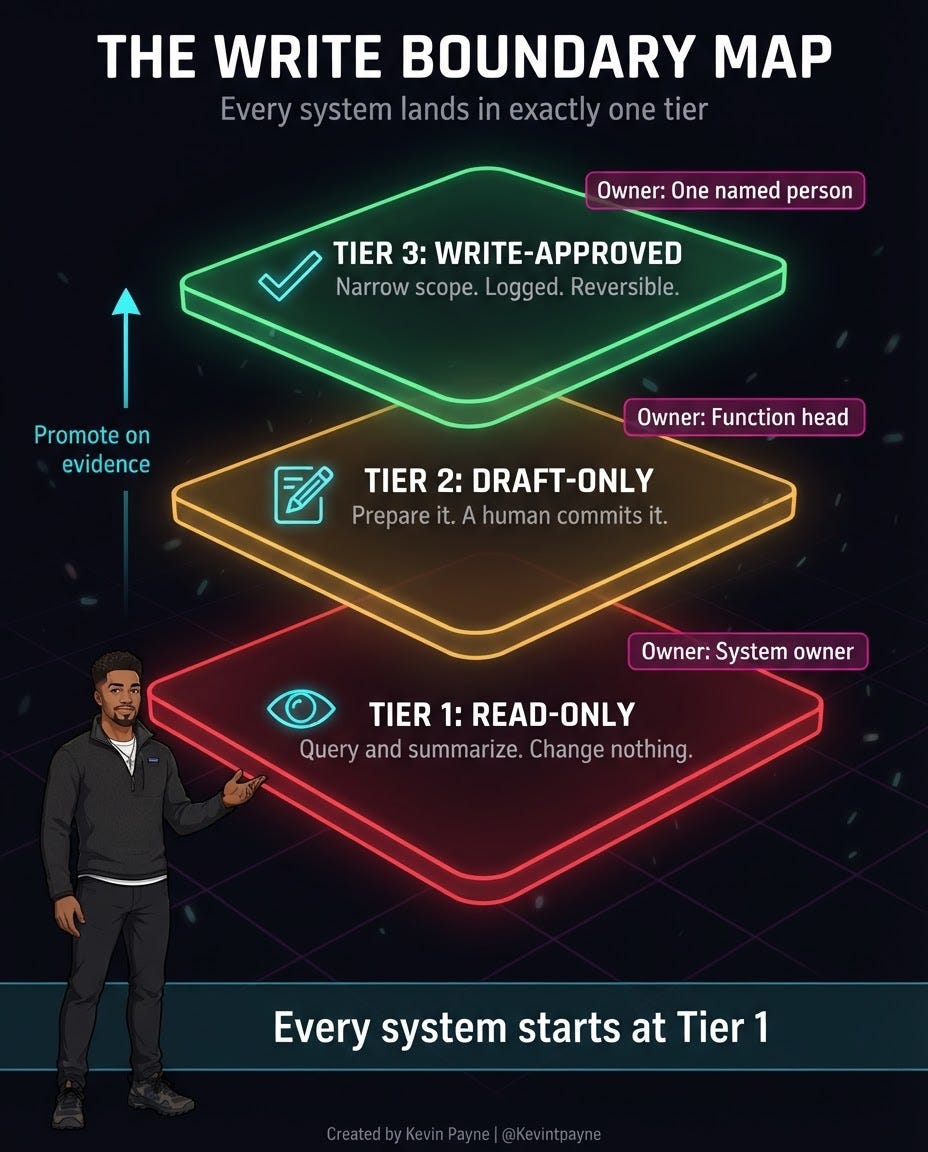
The Write Boundary Map has three tiers. Every system in your stack lands in exactly one.
Tier 1: Read-only. The agent can query, summarize, and analyze. It cannot change anything. This is the default for every system on day one.
What it fits: systems of record where an error is expensive or invisible, such as billing, contracts, the data warehouse, and core revenue fields in the CRM.
Approval owner: the system owner grants access once and reviews it on a set schedule.
Tier 2: Draft-only. The agent can prepare a change but cannot commit it. The change lands in a holding area, and a human commits it. Think of proposed field updates in a review queue, message drafts that have not been sent, or new pages in a review database.
What it fits: anything a customer or prospect can see, and anything that touches many records at once.
Approval owner: the function head who owns the outcome. For outbound copy, that is the sales or marketing leader whose name is on the result.
Tier 3: Write-approved. The agent can commit changes directly, but only inside a narrow, named scope, with a log and a way to undo.
What it fits: low-exposure, easily reversed, well-logged work such as filling enrichment fields the team has already agreed are non-critical, or writing to the agent’s own workspace pages.
Approval owner: one named individual, in writing, with a review date. Not a team. Not “RevOps.”
The rule that holds the whole map together: every system starts at Tier 1, and moves up only on evidence. No system starts at Tier 3 because the demo looked good.
How to Classify a System: Four Questions
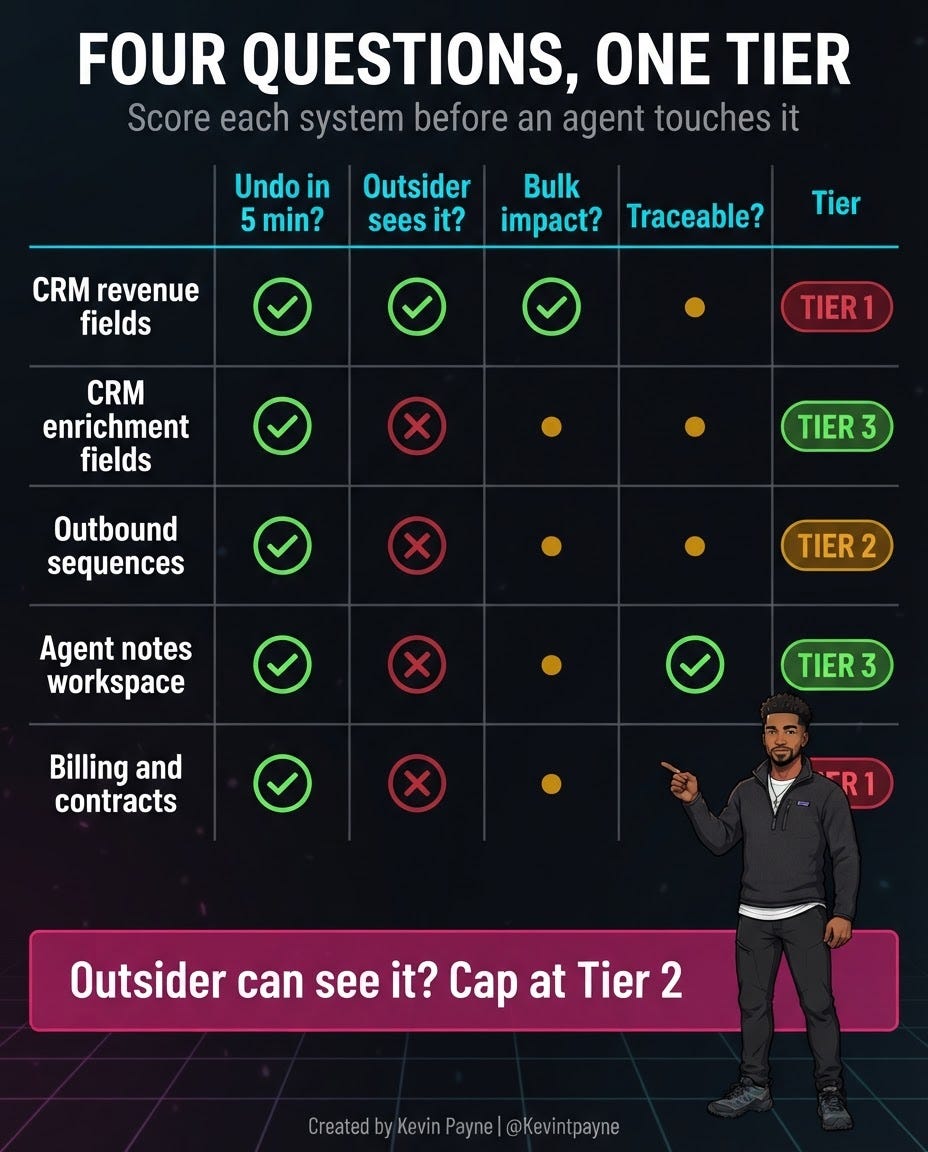
Tiers are useless if you assign them by gut feel. Ask four questions about each system, and let the answers set the ceiling.
1. Can it be undone in five minutes? If a bad write can be reversed quickly and completely, the system can sit higher. If undoing it means a data cleanup project, it stays low.
2. Can an outsider see it? If a prospect, customer, or partner can see the result, the ceiling is Tier 2 until the agent has a clean track record. A field edit in the CRM stays inside the building. An email in a sequence does not.
3. How many records can one action touch? A single-record edit and a bulk update are different risks. If one action can touch a whole segment, cap the scope or hold the system at Tier 2.
4. Can you reconstruct what the agent did and why? If the system gives you no usable log, the agent has no business writing to it. Untraceable systems stay at Tier 1.
The scoring rule is simple. Any system where the answer to question 2 is yes, or the answer to question 4 is no, is capped low. A system reaches Tier 3 only when it passes all four.
Implementation: Enforce the Boundary at the Credential
A boundary that lives only in a document is a suggestion. The boundary has to be enforced where the agent connects. Here is the build order I recommend, roughly 20 to 30 minutes per step for a first pass.
Step 1: List every system the agent could touch (20 minutes). CRM, sales engagement, marketing automation, enrichment, notes and knowledge base, billing, the warehouse. Include the ones you think are “just reference.” Agents find those first.
Step 2: Classify each system with the four questions (30 minutes). Do it with the system owner in the room. The conversation is the point. Disagreements about the tier are the most valuable output of the exercise.
Step 3: Name the approval owner per tier (15 minutes). One person per system for Tier 3, one function head per system for Tier 2. Write the names down.
Step 4: Give the agent its own identity (30 minutes). Do not reuse a person’s login. Create a dedicated integration user or service credential, so the agent’s actions are separate from any human’s and can be revoked without side effects.
Step 5: Scope the credential to the tier (30 minutes). This is where the map becomes real. In Salesforce, that means a dedicated user with its own permission set and field-level security, tested in a sandbox before it touches production. In Notion, it means limiting which pages and databases the agent’s connection can reach and whether it can only read or also edit. In Outreach, the boundary is whether the agent can build and stage sequence content, or whether anything can actually enroll a contact and send.
Step 6: Add a kill switch and a log review (15 minutes). Know how to revoke the credential in one move. Put a recurring review on the calendar to read what the agent actually did.
If you only do one thing this week, do Step 4. A shared personal login is the single most common way a boundary quietly disappears.
Promotion: How a System Moves Up a Tier
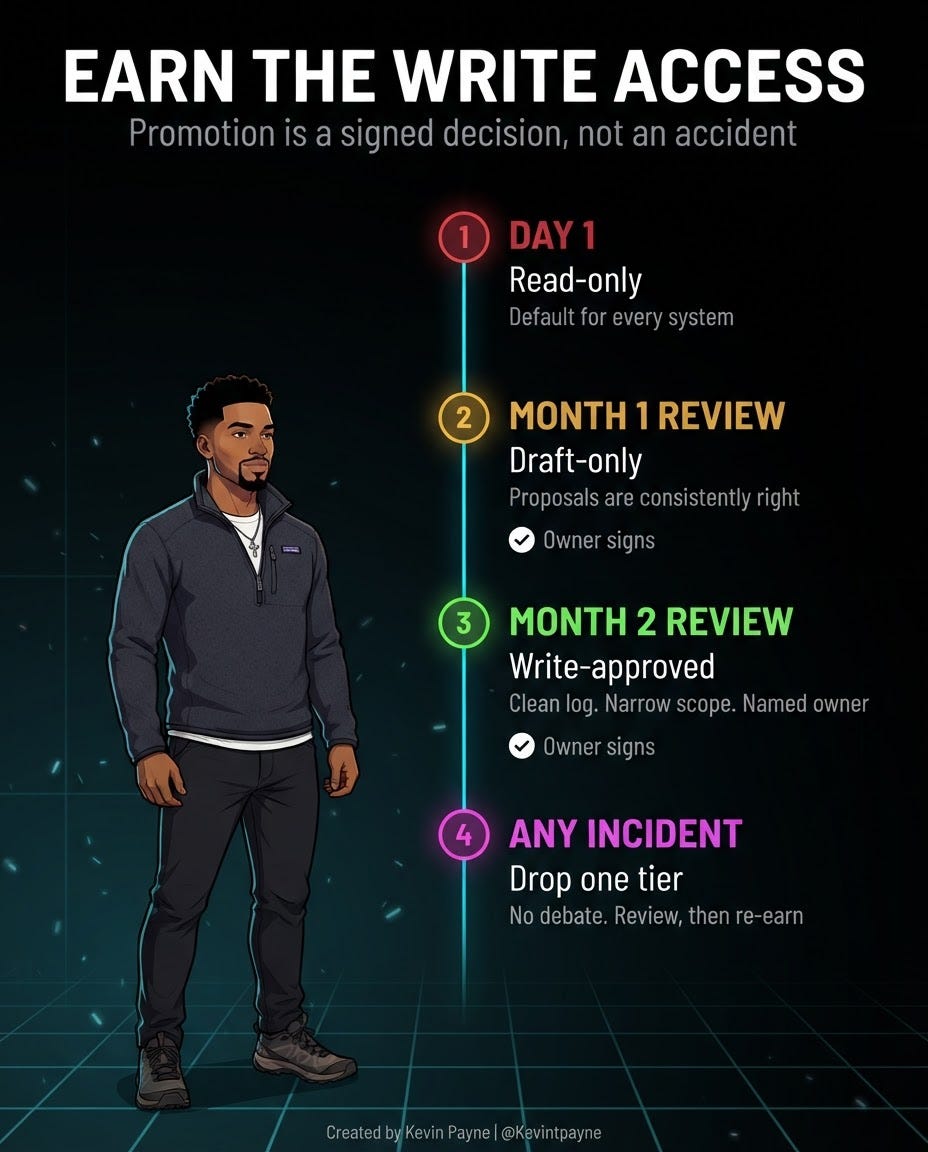
The map is not permanent. It is a starting position. Systems move up based on evidence, following the same progression I use for every automation: manual, then human-in-the-loop, then autonomous.
Read-only to draft-only: the agent’s summaries and proposals have been correct often enough that reviewing them is faster than doing the work by hand.
Draft-only to write-approved: the human approving the drafts changes almost nothing, the log is clean, and the scope is narrow enough that a mistake is cheap.
Any tier back down: one incident with real customer or revenue impact moves the system down a tier immediately, no debate. You can promote again after the review.
Set a review window and keep it consistent. I like a monthly cadence, because it is short enough to catch drift and long enough to collect real evidence. The point is that promotion is a decision someone signs, not something that happens by accumulation.
An Illustrative Example: One Stack, Three Boundaries
To keep this concrete, here is a hypothetical. It is an illustration of how the map works, not a description of any real client.
Imagine a Series B SaaS company that brings in a fractional operator to connect an agent to its stack. The stack has a CRM built on Salesforce, a sales engagement platform (Outreach), and a team workspace in Notion.
Salesforce: split by field, not by system. The agent gets Tier 1 on the fields that drive forecasting and reporting, such as stage and amount. It gets Tier 2 on suggested changes to account fields, delivered to a review queue. It gets Tier 3 only on a short list of enrichment fields the team has agreed are low stakes and easy to restore. One system, three different boundaries. That is normal, and it is why the map works at the field and object level, not just the platform level.
Outreach: Tier 2, with the human owning the send. This is the system where a mistake leaves the building. A sequence puts a message in a real buyer’s inbox. So the agent can research, draft copy, and stage a sequence for review. A human approves and enrolls. The approval owner is the sales leader, because the result carries their name.
Notion: Tier 3, inside the agent’s own space. The agent writes meeting summaries, research notes, and briefs into a workspace built for it. The exposure is low, everything is versioned and easy to reverse, and the agent has read-only access everywhere else. This is where the agent earns its first real write access, safely.
Notice what the fractional operator did not do. They did not start with the most powerful setup and pull back after an incident. They started at the floor and let each system earn its way up. Faithfulness in small things earns responsibility over larger things. That is an old principle, and it is exactly how you should treat software that can act in your revenue systems.
Common Failure Modes
The shared login. The agent runs on a human’s credential, so its authority equals the most privileged person who set it up. Fix: a dedicated identity.
Platform-level thinking. “We gave it CRM access” is not a boundary. The boundary is which objects, which fields, and which actions. Fix: classify at the field level.
Promotion by enthusiasm. A system moves up because a demo went well, not because a log looked clean. Fix: promotion requires evidence and a signature.
No named owner. “RevOps owns it” means nobody owns it. Fix: one name per Tier 3 system.
The reference system trap. A notes tool or knowledge base gets treated as harmless, then becomes the place the agent quietly stores or overwrites things the team relies on. Fix: classify it like everything else.
FAQ
What are AI agent write permissions in a GTM stack? They are the rules that define which systems an AI agent can change, and how. In a GTM stack, that covers the CRM, sales engagement tools, marketing automation, enrichment, and knowledge bases. A read permission lets the agent view data. A write permission lets it create, edit, or trigger actions.
Is MCP a skill or a permissions decision? Learning how MCP works is a small technical task. Deciding what an MCP connection is allowed to do is a permissions decision, and it belongs to the operator accountable for the outcome.
Which GTM systems should an AI agent only read? Start every system at read-only. Systems that should stay there longest are the ones where errors are expensive or hard to see: billing, contracts, the data warehouse, and the core revenue fields in the CRM.
What does draft-only mean? The agent prepares a change, such as a proposed field update or an unsent message, and a human commits it. It is the right tier for anything a prospect or customer can see, and for actions that could touch many records at once.
When can an agent have write access? When the system passes four checks: the change is easy to undo, nobody outside the company can see it, one action touches a limited number of records, and you can reconstruct what the agent did. Even then, name one approval owner and set a review date.
Who should approve an agent’s write access? One named person per system for write-approved access, and the function head who owns the outcome for draft-only access. Not a team.
Your Move
Pick one system in your stack where an agent already has more access than you would give a new hire. Move it down one tier this week. You will learn more from that one decision than from any demo.
If this was useful, forward it to the person in your company who signs off on system access. That is usually the person who has not yet been part of the agent conversation, and they should be.
Reply and tell me which system you would demote first. I read every response.
Until next Tuesday, Kevin
I’m a GTM/RevOps engineer who prototypes AI workflows inside a real operator role, then teaches the portable frameworks so other operators can implement safely and prove ROI.
Brand links used: Salesforce, Outreach, Notion Creators cross-linked (name only, no handles): Darrell Alfonso, Maja Voje (via GTM Strategist)